
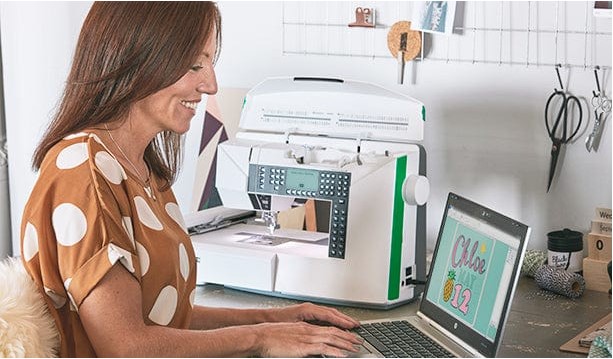
If you want to convert logo to embroidery, you know that precision is key. Simply uploading a logo to an embroidery machine won’t guarantee clean, professional results. Each logo needs to be digitized, which means translating the image into a format that tells the machine exactly how to stitch it. Proper digitization ensures smooth curves, accurate colors, and consistent stitch density for the best possible embroidery outcome.
Whether you’re a business producing branded merchandise, a hobbyist creating custom gifts, or a professional embroiderer, converting your logo properly is the foundation of flawless embroidery.
What Does “Convert Logo to Embroidery” Mean?
Converting a logo to embroidery involves taking a digital image (PNG, JPG, AI, or other formats) and transforming it into an embroidery-ready file, such as PES, DST, or EXP. This file contains instructions for the machine, including:
- Stitch types: Satin, fill, or running stitches
- Stitch paths: The order in which stitches are made
- Thread colors and sequences
- Underlay and pull compensation
- Density adjustments
Without proper digitization, logos often appear distorted, uneven, or messy when stitched. The conversion process ensures your design is not only readable by the machine but also visually perfect on fabric.
Why Professional Logo-to-Embroidery Conversion Matters
1. Maintain Brand Integrity
A logo represents your brand. Poorly digitized embroidery can distort letters, shapes, or icons, which may damage your brand’s image. Professional conversion preserves every detail.
2. Ensure Stitch Accuracy
Machines rely on precise instructions. Proper digitization guarantees that stitches follow curves, angles, and edges perfectly.
3. Save Time and Reduce Errors
Manual trial-and-error stitching can waste materials and time. A properly converted logo ensures the first stitch looks great, avoiding repeated corrections.
4. Adaptable Across Fabrics
Different fabrics require different stitch densities. Professional conversion takes into account fabric type, ensuring the logo looks perfect whether on cotton, denim, or fleece.
5. Consistent Results
Once a logo is digitized correctly, it can be stitched multiple times with the same high-quality result every time.
Step-by-Step Process to Convert Logo to Embroidery
Step 1: Prepare the Logo
- Use a high-resolution image (300 DPI or higher).
- Remove unnecessary backgrounds or noise.
- Ensure colors are distinct and clear for easier thread mapping.
Step 2: Choose the Right Digitizing Software
Professional software like Wilcom, Hatch, or Brother PE-Design can convert logos into embroidery files. These tools allow for fine control over stitch types, density, and pathing.
Step 3: Set Stitch Parameters
- Select appropriate stitch types for each section (satin for letters, fill for large areas).
- Adjust stitch density according to fabric thickness.
- Configure underlay to stabilize the design and prevent puckering.
Step 4: Optimize Stitch Pathing
The order of stitches affects efficiency and the final appearance. Optimized pathing reduces thread breaks and ensures smoother curves.
Step 5: Preview and Test
Most digitizing software allows you to preview the stitched design. Run a small test stitch on a scrap piece of fabric to verify accuracy.
Step 6: Export the File
Once satisfied, export the file in the appropriate format for your machine (PES, DST, EXP, VP3, or others).
Tips for High-Quality Logo-to-Embroidery Conversion
- Simplify Complex Logos: Tiny text or intricate gradients may not stitch well. Simplify without losing essential details.
- Choose Contrasting Colors: High contrast ensures visibility on fabric.
- Check Fabric Compatibility: Adjust stitch density and underlay depending on the material.
- Use Vector Logos if Possible: Vector files (AI, EPS, SVG) are easier to digitize and produce cleaner results.
- Always Test Stitch: Even a perfectly digitized logo may behave differently on various fabrics.
Common Mistakes to Avoid
- Digitizing low-resolution images
- Ignoring stitch density adjustments for different fabrics
- Using automatic conversion without review
- Forgetting to preview the design
- Overcomplicating small elements
Avoiding these mistakes ensures a polished, professional finish every time.
Benefits of Professional Logo-to-Embroidery Conversion
- Time-Saving: Reduces manual adjustments and trial stitching.
- Consistency: Perfect repeatable embroidery for multiple garments.
- Professional Finish: Smooth, accurate stitches with no distortion.
- Material Efficiency: Less wasted thread and fabric.
- Brand Protection: Maintains logo integrity across all embroidery projects.
Who Can Benefit from Logo-to-Embroidery Conversion?
- Businesses: Create high-quality branded uniforms, promotional items, and merchandise.
- Schools and Clubs: Stitch logos on jerseys, hats, and event gear.
- Online Sellers: Offer custom embroidered designs without investing in extensive hardware.
- Hobbyists: Personalize gifts with accurate, professional-looking logos.
- Embroidery Shops: Provide clients with flawless embroidery, boosting satisfaction and reputation.
Conclusion
Converting a logo to embroidery isn’t just about turning a digital image into a machine-readable file; it’s about precision, quality, and professionalism. Proper digitization preserves brand identity, ensures accurate stitching, and delivers consistent, high-quality results across different fabrics and projects. Following best practices such as using high-resolution images, optimizing stitch paths, adjusting stitch density, and previewing designs guarantees the best outcome every time.
For fast, reliable, and professional services to convert logo to embroidery, Digitizing Buddy is the go-to solution. Their expertise ensures your logos are perfectly digitized, ready for smooth, accurate, and professional stitching, whether you’re a hobbyist or managing large-scale embroidery projects.